Pharmacy Social Media: UGC & Compliance

User Content Tips For Social Media Growth
If you want social media growth for a pharmacy, the short answer is this: use patient-led content, but treat privacy and consent as the first rule. Reviews, questions, event posts, comments, and patient stories can help because people pay attention to what other people say. And the numbers back that up: 98% of consumers read online reviews before visiting local businesses, while 79% say user content affects healthcare decisions.
Here’s the simple version of what matters most:
Start with reviews because they are the easiest source of social proof
Give staff one short script to ask for feedback the same way every time
Use signs in the pharmacy to prompt reviews, tags, and posts
Turn common questions into content like “Ask the Pharmacist” or “Myth vs. Fact”
Use patient stories only with written permission
Check every post for HIPAA, FDA, and FTC issues before it goes live
Track what leads to calls, clicks, messages, and map requests, not just likes
Build the process into daily work so staff know what to ask, what to save, and what not to post
A few rules stay the same across all of it:
A public tag or comment is not permission to repost
Written HIPAA authorization is required before reusing patient content
Public replies should stay general
No incentives for reviews
503A and 503B pharmacies need extra review for compounded medication claims and risk disclosures
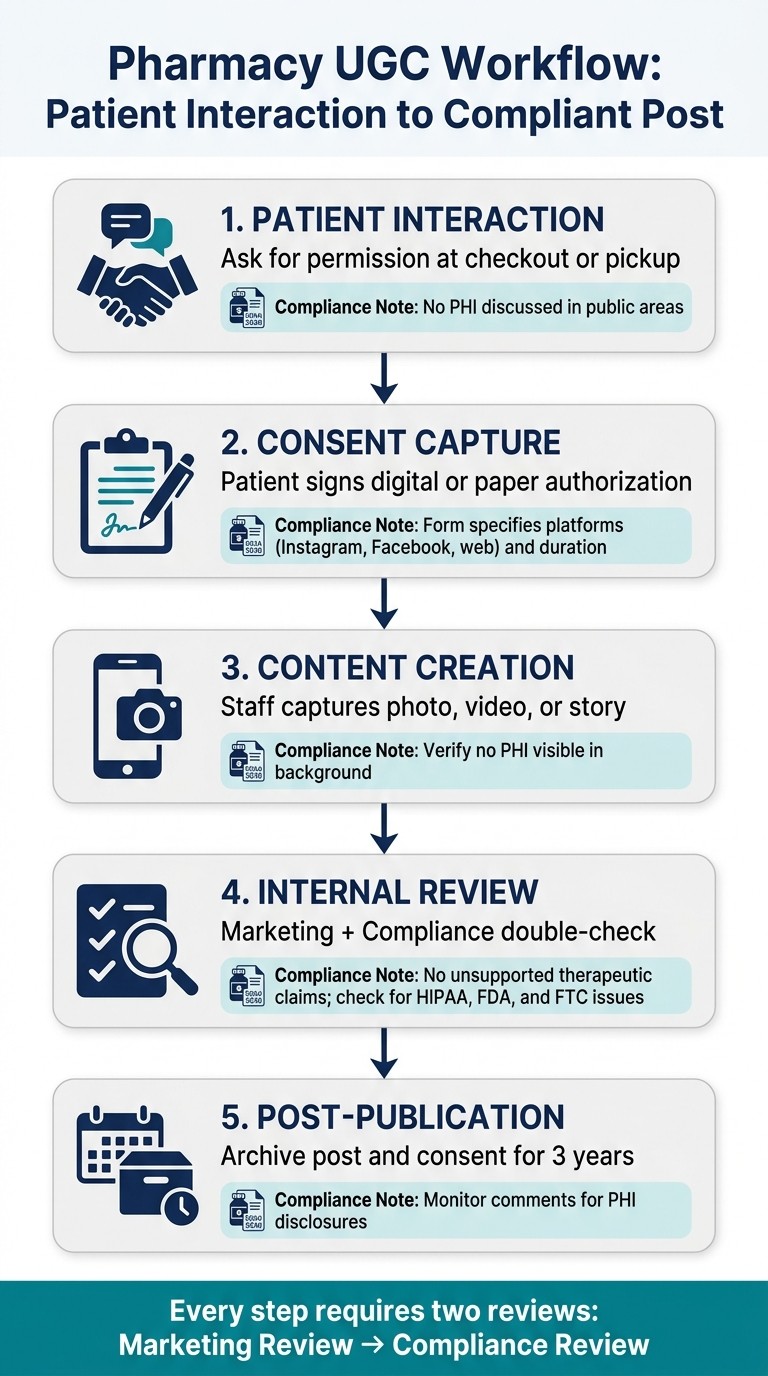
Pharmacy UGC Workflow: From Patient Interaction to Compliant Post
Quick comparison
Content type | Main use | Risk level | Best starting point |
|---|---|---|---|
Reviews | Social proof | Medium | Yes |
Patient stories | Human proof | High | Only with written consent |
Questions and answers | Education and trust | Low | Yes |
Tagged photos/posts | Community visibility | High | Only with written consent |
Event content | Local reach | Low to medium | Yes |
Comments/DM topics | FAQ content | Medium | Yes, after review |
The main idea is simple: I’d use user content to make pharmacy social media feel more human, but I’d only do it with a set review process, written consent, and plain rules staff can follow every day.
1. Use Patient Reviews as a Starting Point for UGC
Patient reviews are the easiest place to begin with UGC. They’re already public, simple to reuse, and easy to ask for.
Why Reviews Work
Reviews give pharmacies a direct form of social proof, which matters a lot when someone is picking a pharmacy online. A post from your brand is one thing. A comment from a real patient often means more.
Protect Privacy First
This is where pharmacies need to slow down and be careful. HIPAA prohibits disclosing Protected Health Information (PHI) without explicit written authorization, and that includes public review responses. Even a reply like “It was great treating you” can violate HIPAA.
The safer move is to keep replies general and move anything tied to care, treatment, or medication into a secure channel. That way, you can stay helpful without putting patient privacy at risk.
Turn Reviews Into Posts
Once you have approved reviews, you can turn them into social content. Screenshot the review, remove names, photos, and medication details, and then reuse it as a feed post or Story.
Build Review Collection Into Workflow
This works best when it’s part of the day-to-day process, not a one-off ask.
Put QR codes at the consultation window or checkout counter that link straight to your Google review page.
Send a follow-up text 2–4 hours after the visit to ask for feedback. That timing can help, especially since 70% of consumers have left a review when a business simply asked.
For 503B facilities and treatment-specific promotions, pair testimonials with required risk disclosures.
Once that system is set, staff can use the same request each time, which makes review collection much easier to keep up.
2. Give Staff a Simple Script for Requesting UGC
Give staff one short script so each UGC request sounds natural and stays consistent. Once your review process is set, the next step is simple: make sure staff have one line they can use every time.
Compliance Sensitivity
The biggest risk here is asking in a way that reveals PHI. The script should stay generic and never confirm that someone is a patient or refer to a medication, condition, or treatment. A line like, > “We’d love your feedback on your experience with us”, works well because it keeps the request HIPAA-safe.
Timing matters too. Ask right after a good interaction, when the experience is still fresh and the person is most likely to share.
That said, a public reply does not mean you can repost it. If a patient comments or tags your business, treat that as a lead, not as permission. A patient tag is not permission to repost; get written HIPAA authorization first.
One approved review or photo can go a long way. You can reuse it across posts, Stories, testimonials, and ads, as long as the right permissions are in place.
The tone can shift a bit based on pharmacy type, but the ask should stay short and generic:
503A pharmacies can use a casual, experience-focused approach.
503B outsourcing facilities should pair any testimonial with required risk disclosures.
One more point: never offer discounts, gifts, or any other incentive for reviews. That goes against both Google’s policies and FTC guidelines.
3. Use In-Pharmacy Signs to Encourage Patient Posts
A well-placed sign can nudge patients to post without asking your staff to do a thing. That makes signage one of the easiest ways to keep the UGC prompt in front of people all day.
Compliance Sensitivity
Keep the wording generic and focused on the visit itself. A prompt like “Share your experience and tag #[PharmacyName]” invites people to join in without mentioning medications, conditions, or treatments. Also, don’t place signs near clinical areas where charts or screens could end up in the background of a patient photo.
Patient Trust Value
Patient posts often feel more believable than brand-written copy. That’s part of the appeal. People tend to trust what other people share, especially when it looks natural and not overly polished.
Reuse Potential
If a patient photo or comment comes in because of a sign, you still need written HIPAA authorization before you reuse it. A QR code that links to the consent form makes that step much easier. Once you’ve collected the post the right way, you can slot it into your social content calendar.
For 503A and 503B Pharmacies
For 503A and 503B pharmacies, send all sign-driven content through marketing and compliance before it goes live. If there’s any incentive tied to the post, add #ad or #sponsored as required.
Sign Location | Suggested Message | Key Compliance Note |
|---|---|---|
Checkout Counter | “Leave us a review.” + QR code | Generic language only; no clinical references |
Waiting Area | “Share your experience and tag #[PharmacyName].” | Keep PHI-free; no condition or treatment mentions |
OTC/Front End | “Tag #[PharmacyName] with your favorite wellness find.” | Add FTC disclosure requirement if incentivized |
Prescription Bags | Add our social handle or hashtag. | Helps the prompt reach patients at home |
Once signs start bringing in posts, comments, and tags, you’ve got raw material for more social content. A simple in-store prompt can turn one patient interaction into something you can share again later.
4. Share Patient Stories Without Exposing Private Details
Patient stories can hit home in a way plain marketing copy often can’t. But for pharmacies, there’s a hard line: if a story comes from a review, comment, or DM, you can only turn it into content after you remove private details and get permission.
Compliance Sensitivity
Use written authorization that spells out the content, where it will appear, and how long you can use it. The form should name the content, platforms, and expiration date. Before anything goes live, strip out all 18 HIPAA identifiers from the story, including names, ZIP codes, specific dates, and social media handles.
After that, center the post on the outcome or experience the story shows.
Patient Trust Value
63% of consumers trust stories from real people more than brand advertising. That makes this kind of content useful when it’s handled the right way. For example, a post like “One of our patients shared that after switching to a compounded formulation, they finally found a routine that worked for them” stays compliant while still sounding human.
Repurposing Potential
One approved story can stretch into 4–6 social assets, such as:
A standard post
A carousel
A Reel
A profile update
That gives one patient-approved story more mileage across your social channels.
Workflow Fit for 503A/503B Pharmacies
For 503A and 503B pharmacies, every story should pass through both marketing and compliance before posting. Keep the signed authorization, review notes, and timestamps stored together so there’s a clear record of what was approved and when.
5. Turn Common Patient Questions Into a Recurring Content Series
Not every UGC post has to be a testimonial. Common patient questions can build the same kind of trust.
A recurring “Ask the Pharmacist” series is a simple way to turn one common question into repeatable social content. The best part? You don’t have to guess what to talk about. Questions asked at the counter, in comments, and through DMs show you what people already want to know. When the same topics keep coming up, turn them into a weekly series. That keeps your content steady and much easier to produce.
“If one patient asked it, 100 others are thinking it.”
Keep each answer general and educational. If someone asks for personal medical advice, send them to their pharmacist or physician. You can also use a “Myth vs. Fact” format to clear up common medication misconceptions. It’s a simple way to show expertise, and it often gets people to comment and share.
Compliance Sensitivity
Before anything goes live, review each post for tone and regulatory accuracy. Also check the frame carefully. No patient names, faces, prescription labels, or visible screens should appear in the background of any video. For recordkeeping, log the approval date and the reviewers for every post.
Patient Trust Value
This format works because it feels human and useful. Seeing a pharmacist answer a real question on camera can build trust and reinforce expertise.
Repurposing Potential
One short clip can go a long way. Repurpose it across TikTok, Instagram Reels, Facebook, and your website FAQ.
Workflow Fit for 503A/503B Pharmacies
To keep the process light, batch 3–4 clips at a time so you have the next two weeks covered.
6. Run Simple, Compliant Photo or Story Campaigns
Once your questions and story prompts start getting traction, take the best responses and turn them into a short photo or story campaign. Keep it simple. But before any patient content goes live, make sure you have written authorization and a clear review path in place.
Get signed HIPAA authorization before posting any patient photo or story. Give patients plain submission rules, and leave out personal or clinical details. If you offer any incentive, like a discount, a free sample, or a contest entry, the post needs a clear disclosure such as #ad or #sponsored.
Compliance Sensitivity
Review every submission twice: once from a marketing angle and once from a compliance angle before posting. Then check the image itself for visible PHI in the background. That includes things like prescription labels, computer screens, or wall-mounted patient boards.
Patient Trust Value
86% of consumers say authenticity is a key factor when deciding which brands to support. That gives properly authorized patient content real weight on social media for pharmacies.
Repurposing Potential
A single approved patient story or photo can go a long way. You can reuse it across Reels, TikToks, paid ads, and email. The easier it is to track approvals and find approved assets, the less work these campaigns take over time.
Workflow Fit for 503A/503B Pharmacies
Keep a shared log, whether that’s a shared folder or a simple spreadsheet, with every signed authorization, content release, and approval decision plus timestamps. For 503A and 503B pharmacies, any content that mentions compounded medications must avoid unsupported therapeutic claims and include risk disclosures when required. Build those checks into intake so the campaign stays steady and compliant.
7. Use Community and Professional Events to Generate User Content
Events give your pharmacy something big chains often struggle to match: a local face and a local story. If you’re sponsoring a charity run, setting up a booth at a community fair, or hosting a health seminar, you’re putting your team in front of people in a way that feels human. And those moments naturally lead to photos, stories, and reactions that people may want to share. Unlike reviews or tagged posts, events can spark UGC before patients are even thinking about marketing.
Branded apparel can help with this too. When people wear your pharmacy’s t-shirts or hats at a charity event, they often post photos on their own without any prompt. That kind of event content works because it feels local and personal. 79% of consumers say UGC significantly shapes which healthcare providers and products they choose.
That said, visibility comes with risk. Before you reshare any photo or story that identifies a patient, get written authorization. Then check each image closely for charts, screens, badges, and any other visible PHI. Crowded events add another issue: people who didn’t consent can show up in the background without anyone noticing at first glance. So review every frame before posting. And if you offer a raffle entry or gift card in exchange for sharing, the post needs a clear #ad or #sponsored disclosure.
Once the content is approved, a single event can give you material for several posts. One health seminar, for example, can turn into 4–6 distinct posts: a key stat for Facebook, a takeaways carousel for Instagram, a 30-second Reel of a pharmacist answering a common question from the event, and a summary update on your Google Business Profile. Batch those posts and schedule them in one review session. It’s a simple way to keep your feed active without piling more daily work onto staff.
For compounding pharmacies, keep event content focused on education, not product promotion. Send event content through both marketing and compliance before it goes live. It also helps to keep signed authorizations and review decisions on file, so you have a clear record if you’re ever audited, and so each event becomes a repeatable source of UGC you can use again and again over time.
8. Turn Comments and Messages Into Shareable Posts
Public comments and direct messages can be a smart source of content. They tend to bring out the questions patients care about most, which makes them useful for educational posts when you handle them with care and stay compliant. In many cases, these chats become the clearest starting point for FAQ posts, quote graphics, and short educational content.
Compliance Sensitivity
Keep public replies neutral, and get signed authorization before you reuse any comment or DM.
Patient Trust Value
Fast, steady replies help build trust. 88% of consumers are more likely to use a business that responds to all of its reviews. That kind of steady, professional engagement shows patients your pharmacy is paying attention and ready to respond.
Repurposing Potential
When a comment answers a common question, don’t let it stop there. Turn it into a post that helps other people with the same concern. Take a screenshot of the comment or DM, blur all identifiers, get explicit written permission, and rewrite it as a general educational post before publishing.
Workflow
For 503A and 503B pharmacies, send every repurposed comment through the full review path: public reply, marketing review, compliance review, and final redaction before posting.
9. Use Analytics to Find Which UGC Topics Perform Best
Not all UGC works the same way. Analytics help you see which topics are worth more of your time, and which types of UGC - reviews, comments, stories, and question posts - lead to action.
Focus on conversion metrics, not just likes. Track calls, messages, map requests, website clicks, and new patient inquiries so you can connect specific UGC topics to actual business results. Use UTM parameters or dedicated landing pages to tie those actions back to a specific post. If one post keeps bringing in more inquiries, that’s a strong sign it deserves another run.
Of course, performance alone isn’t enough. A post can get a lot of attention and still create compliance problems. Maybe it did well because it shared a patient detail that never should have gone live in the first place. Before you scale any UGC topic, make sure it has been reviewed for HIPAA, FDA, and FTC compliance. Analytics show what hits home with patients. Compliance review shows what your team can post again without trouble.
When you find a topic that works, repurpose it into a few formats. That gives you more mileage from content that has already shown it connects.
Review your top posts every month, flag the UGC winners, and send them through both marketing and compliance. Then use what you learn to guide day-to-day posting and staff training. Those patterns should shape what your team posts next.
10. Build UGC Practices Into Daily Pharmacy Workflows and Staff Training
Once you know which UGC topics land well, the next move is simple: make collection and approval part of the day-to-day routine.
That matters because good UGC can’t live on guesswork. If one team member asks for permission one way, another skips a review step, and someone else posts on the fly, things can go sideways fast. A repeatable process keeps the work clean and lowers risk.
Compliance Sensitivity
Every UGC workflow should go through two reviews before anything is posted: Marketing Review for brand fit, followed by Compliance Review for HIPAA, FDA, and FTC rules.
Verbal consent isn’t enough. You need signed authorization before posting anything. It also helps to keep one central archive for signed consent forms, approval timestamps, and licensing agreements. If questions come up later, your team has a clear record instead of scrambling to piece things together.
Patient Trust Value
Patients can tell when a pharmacy treats their stories with care.
And that trust is fragile. One post shared without proper consent, or one detail a patient didn’t mean to make public, can do damage fast. Quarterly staff training on HIPAA social media scenarios helps keep everyone sharp and helps protect that trust over time.
Repurposing Potential
One strong piece of UGC can go a long way.
A short video of your compounding process, for example, can be reused across Instagram Reels, TikTok, and email newsletters. Once that content clears both review steps, archive it. That way, staff can use it again later without starting the approval process from scratch.
Workflow Fit for 503A/503B Pharmacies
Compounding pharmacies deal with extra regulatory pressure. Any UGC that suggests a compounded product is equivalent to an FDA-approved drug creates real risk.
That’s why social posting access should stay limited to trained, authorized team members. Fewer hands on the controls usually means fewer mistakes.
Use the same workflow every time:
Workflow Step | Action | Compliance Check |
|---|---|---|
Patient Interaction | Ask for permission at checkout or pickup | No PHI discussed in public areas |
Consent Capture | Patient signs digital or paper authorization | Form specifies platforms (Instagram, Facebook, web) and duration |
Content Creation | Staff captures photo, video, or story | Verify no PHI visible in background |
Internal Review | Marketing + Compliance double-check | No unsupported therapeutic claims |
Post-Publication | Archive post and consent for 3 years | Monitor comments for PHI disclosures |
Comparing Common Pharmacy UGC Formats
UGC formats don’t all work the same way. Some are easy to approve but may get a modest response. Others can drive a lot of engagement, but they come with more compliance risk and more work for staff.
This comparison helps you pick the best fit before you post. The idea isn’t to publish everything. It’s to focus on what your team can approve with less friction and what has the best shot at performing well.
UGC Format | Compliance Risk | Staff Effort | Engagement Potential | Best Platforms |
|---|---|---|---|---|
Public Reviews | Medium | Low | High | Google Business Profile, Facebook |
Testimonials | High | High | High | Facebook, Instagram, TikTok |
Tagged Photos | High | Medium | High | Instagram, Facebook |
Event Posts | Low | Medium | Medium-High | Facebook, Instagram |
Question-Based Content | Low | Low–Medium | High | Facebook, Instagram Reels, TikTok |
Before you repost any user content, remove PHI, including names, faces, conditions, and other identifiers.
For most pharmacies, question-based content and event posts tend to be the best place to start. They offer a strong mix of lower risk and steady engagement. A simple way to think about platform fit:
Facebook works well for reviews and community updates
Instagram fits visual UGC
TikTok fits short educational clips
Conclusion
Pharmacy UGC works best when it feels human and protects patient privacy. Put all of this together, and the pattern is pretty clear: patient reviews, privacy-safe stories, community moments, and simple internal approvals are what drive steady social growth.
Across reviews, stories, events, and comments, the formula is simple: repeatable, compliant content.
For compounding pharmacies, compliance is the gatekeeper behind every UGC win. For 503A and 503B compounding pharmacies, a two-step review process - marketing review, then compliance review - isn’t optional.
503A and 503B pharmacies can find practical compliance guidance at 503Pharma. When honest content and strict review habits work side by side, social media growth and patient trust start to build on each other.
FAQs
What counts as written consent?
Written consent usually means a signed authorization form. A direct message or verbal agreement is usually not enough for HIPAA compliance.
The form should clearly explain:
how the patient-generated content will be used
where it will appear
how long it will be used
That kind of detail helps protect patient privacy and supports HIPAA requirements.
How can a pharmacy ask for reviews safely?
Ask for feedback without disclosing or hinting at PHI. Staff should ask after consultations in a general way, without naming a condition, treatment, or visit. And when someone replies, keep the response broad, like “Thank you for your feedback.”
For patient-generated content, such as testimonials or photos, get written, signed authorization first. Then move any specific details offline. Social posts also need to stay HIPAA/FDA compliant, with a clear “not medical advice” disclaimer.
Which UGC type is best to start with?
Start with online reviews. Patients check them all the time, and they help build trust because they come from real people sharing real experiences.
Next, invite patients to post about their experience on social media with branded hashtags, or highlight positive feedback on your own channels. As that starts to gain traction, you can branch out into testimonials, patient stories, and community contributions.
Download Now